








Differences from Mac OS X 10.4
Solution
This section explains the differences between Mac OS X 10.5 and Mac OS X 10.4 functions and setting screens.
CAUTION
The setting screens of TextEdit in Mac OS X 10.5 are used for comparison. The actual screens and functions may differ depending on the application.
REFERENCE
The setting items in the following screens are the same between Mac OS X 10.5 and Mac OS X 10.4.
- Paper Handling
- Cover Page
- Scheduler
- Quality & Media
- Special Effects
- Borderless Printing
- Margin Duplex Printing
- Margin
- Summary
In Orientation, only left-to-right printing is available for landscape printing.
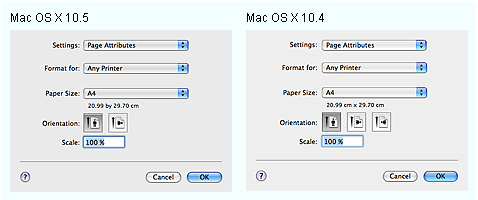
In Mac OS X 10.5, a simplified screen appears first.
Click  to display the setting screen.
to display the setting screen.
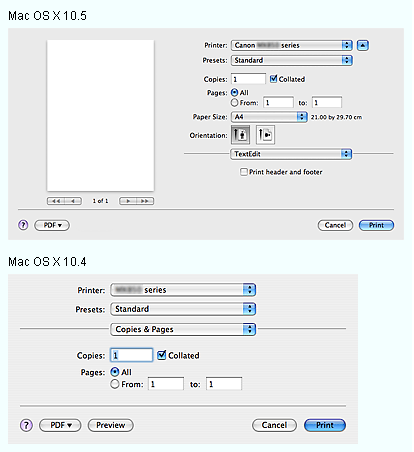
- Copies and Pages
Number of copies, pages to print, paper size and orientation constantly appear in the Print dialog regardless of the pop-up menu.
A preview constantly appears on the left of the screen. Preview may not appear in some applications.
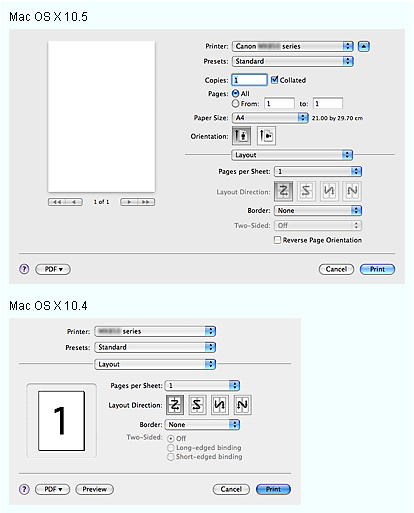
- Layout
You can invert the page orientation. Check Reverse Page Orientation to upside down the direction of printing. Printing from bottom of the page.
- Color Matching
- Color Correction in Mac OS X 10.4 will be set in Color Matching in Mac OS X 10.5.
- Driver Matching in Mac OS X 10.4 will be set in Vendor Matching in Mac OS X 10.5.
