








How do I set the language?
Solusi
1. Press <  >.
>.
>.
2. Select (  ) the [
  ] icon and press <
  > to open the setup menus.
) the [ ] icon and press < > to open the setup menus.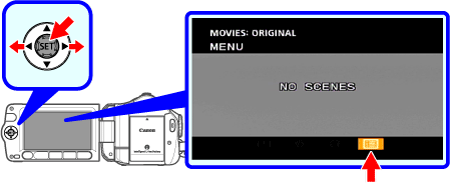
3. Select (  ) [ DISPLAY SETUP/
  ] and press < >.
) [ DISPLAY SETUP/ ] and press < >.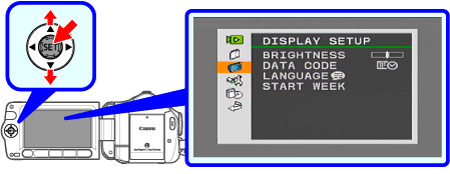
4. Select ( ) [ LANGUAGE ] and press < >.
) [ LANGUAGE ] and press < >.
5. Select ( , ) the desired option and press < >.
, ) the desired option and press < >.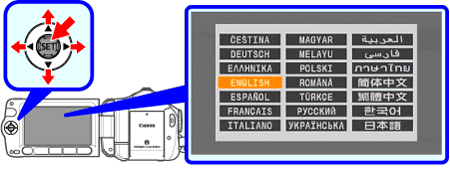
6. Press < > to close the menu.
> to close the menu.CAUTION
- If you changed the language by mistake, follow the mark next to the menu item to change the setting.
mark next to the menu item to change the setting.- The displays and that appear in some menu screens refer to the name of buttons on the camcorder and will not change, regardless of the language selected.
and that appear in some menu screens refer to the name of buttons on the camcorder and will not change, regardless of the language selected.