








Playing back movies with a computer (Mac OS X)
Solusi
CAUTION
- To play back movies on a Macintosh computer, you need to install [ImageBrowser] from the supplied CD-ROM (DIGITAL CAMERA Solution Disk) beforehand.
- The information provided here uses Mac OS X (version 10.6) and [ImageBrowser version 6.5] as examples. Depending on your Mac OS X or software version, the screen indications and operation procedures may differ slightly.
- [ImageBrowser] can only play back movies that are in the [AVI (.AVI)] and [MOV (.MOV)] formats.
- Please transfer the movies or images that you want to play back to your computer beforehand. For details on how to transfer movies to a computer, please refer to the following pages.
1. Click the [ImageBrowser] icon in [Dock] (the task bar that is displayed at the bottom of the desktop).

If you do not see the [ImageBrowser] icon in [Dock], click [Go] in the menu bar, select [Applications] -> [Canon Utilities] -> [ImageBrowser], and then click [ImageBrowser] to start the software.
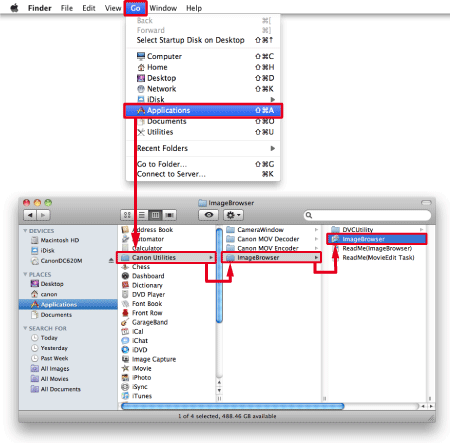
2. [ImageBrowser] starts, and the following window appears.
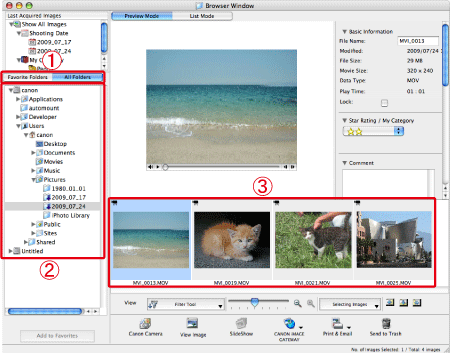
 Click the [Favorite Folders] tab or the [All Folders] tab.
 Select the folder where the target file is saved. (Movies are saved to the [Pictures] folder by default.)
 Double-click the target movie.
3. The following window appears, and the selected movie is played back.
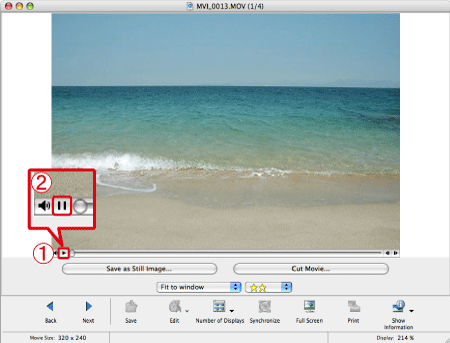 Click [Play] (
 ) to play the movie. (During movie playback, the [Pause] (
 ) button is displayed instead of the [Play] () button)