








How to connect the machine to the computer (USB /wireless LAN)
Isu
Select the method to connect the machine to the computer according to your system environment.
- Connection Types
- USB Connection

A: USB cable
A USB cable is necessary to connect the machine with your computer (USB connection only).
- Network Connection
- Wireless Connection
When using the machine over a wireless connection, the following devices are required.

B: Access point or wireless router
A commercial access point or router that supports IEEE802.11b/g/n is required.
Sebab dan Solusi
This is the recommended installation when you use the machine on single computer, which is not networked.

How to perform the setup using USB connection
- This is the recommended installation when you use the machine on a computer connected to a network.
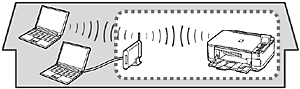
How to perform the wireless LAN setup manually (Windows)
Wireless Setup
How to perform the wireless LAN setup manually (Macintosh)
Wireless Setup
If your access point or router supports WPS (Wi-Fi Protected Setup):

For details on WPS, refer to the manual of your access point.
How to perform the wireless LAN setup using WPS connection (Windows)
Wireless Setup
How to perform the wireless LAN setup using WPS connection (Macintosh)
Wireless Setup
NOTE
- If you are using Windows 7/Vista operating system and have a USB flash drive, you can configure wireless connection settings by using the WCN (Windows Connect Now) function as well.
How to perform the wireless LAN setup using WCN connection (Windows)
Wireless Setup
- Perform only the software installation on the computer you want to use.

How to perform the wireless LAN setup so that other computers can share the same printer (Windows)
Use from Additional Computers
See[How to perform the wireless LAN setup so that other computers can share the same printer (Windows)]
How to perform the wireless LAN setup so that other computers can share the same printer (Macintosh)