








2-Sided Copying (MF4580dn/MF4570dn/MF4550d/D520 Only)
Solusi
You can make 2-sided copies from 1-sided documents.
2. Display the copy mode screen.
For MF4580dn/MF4570dn/MF4550d
- Press [
 ].
].
For D520
- Press [
 ] (COPY/SCAN) until the copy mode screen appears.
3. Press [  ] or [
  ] to select <2-Sided>, and then press [OK].
] or [ ] to select <2-Sided>, and then press [OK].
4. Press [ ] or [ ] to select <1->2-Sided>, and then press [OK].
] or [ ] to select <1->2-Sided>, and then press [OK].
 If you want to specify 2-Sided copying format
(1) Press [ ] or [ ] to select <Format Settings>, and then press [OK].
] or [ ] to select <Format Settings>, and then press [OK].
(2) Press [ ] or [ ] to select <1->2-Sided>, and then press [OK].
] or [ ] to select <1->2-Sided>, and then press [OK].
(3) Press [ ] or [ ] to select the orientation of the original document, and then press [OK].
] or [ ] to select the orientation of the original document, and then press [OK].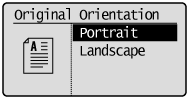
(4) Press [ ] or [ ] to select the finishing format, and then press [OK].
] or [ ] to select the finishing format, and then press [OK].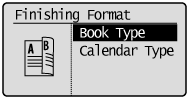
5. Press [  ] (Start).
] (Start).If you place documents on the platen glass(1) Place the next document, and then press [ ] (Start).
] (Start).* Repeat the procedure until all documents are scanned.
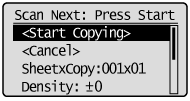
(2) Press [ ] or [ ] to select <Copy>, and then press [OK].
] or [ ] to select <Copy>, and then press [OK]. You can make 2-sided copies from 2-sided documents.
2. Press [ ].
].3. Press [ ] or [ ] to select <2-Sided>, and then press [OK].
] or [ ] to select <2-Sided>, and then press [OK].
4. Press [ ] or [ ] to select <2->2-Sided>, and then press [OK].
] or [ ] to select <2->2-Sided>, and then press [OK].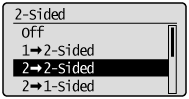 If you want to specify 2-Sided copying format
(1) Press [ ] or [ ] to select <Format Settings>, and then press [OK].
] or [ ] to select <Format Settings>, and then press [OK].
(2) Press [ ] or [ ] to select <2->2-Sided>, and then press [OK].
] or [ ] to select <2->2-Sided>, and then press [OK]. 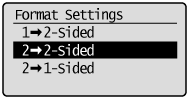
(3) Press [ ] or [ ] to select the orientation of the original document, and then press [OK].
] or [ ] to select the orientation of the original document, and then press [OK].
(4) Press [ ] or [ ] to select the original format, and then press [OK].
] or [ ] to select the original format, and then press [OK].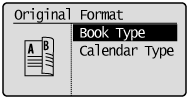
(5) Press [ ] or [ ] to select the finishing format, and then press [OK].
] or [ ] to select the finishing format, and then press [OK].
5. Press [ ] (Start).
] (Start).You can make 1-sided copies from 2-sided documents.
2. Press [ ].
].3. Press [ ] or [ ] to select <2-Sided>, and then press [OK].
] or [ ] to select <2-Sided>, and then press [OK].
4. Press [ ] or [ ] to select <2->1-Sided>, and then press [OK].
] or [ ] to select <2->1-Sided>, and then press [OK].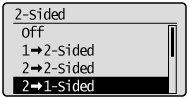 If you want to specify 2-Sided copying format
(1) Press [ ] or [ ] to select <Format Settings>, and then press [OK].
] or [ ] to select <Format Settings>, and then press [OK].
(2) Press [ ] or [ ] to select <2->1-Sided>, and then press [OK].
] or [ ] to select <2->1-Sided>, and then press [OK].
(3) Press [ ] or [ ] to select the orientation of the original document, and then press [OK].
] or [ ] to select the orientation of the original document, and then press [OK].
(4) Press [ ] or [ ] to select the original format, and then press [OK].
] or [ ] to select the original format, and then press [OK].
5. Press [ ] (Start).
] (Start).