








Changing the functions assigned to the Front Dial or the Control Dial (PowerShot G1 X)
Solusi
You can change the functions assigned to the <Front Dial> ( ) or <Control Dial> (
 ) so that these will be easier to operate.
) or <Control Dial> () so that these will be easier to operate.IMPORTANT
- The position and shape of the operation buttons, images displayed, and setting items may differ depending on the model you are using.
REFERENCE

 <Front Dial> ()
  <Control Dial> ()
NOTE
- The following explanations are provided based on the assumption that the [Shooting Mode] is set to [Program] (
 ).
). - To change the functions assigned to the <Front Dial> ( ) or <Control Dial> (), it is necessary to set the [Shooting Mode] to one of the following modes.
- [Manual] ( ), [Aperture Priority] (
 ), [Shutter Speed Priority] (
 ), [Program] ()
), [Aperture Priority] (), [Shutter Speed Priority] (), [Program] ()1. Press the <Power> button on the camera.
2. Press the <MENU> ( ) button.
) button.3. The following window appears.
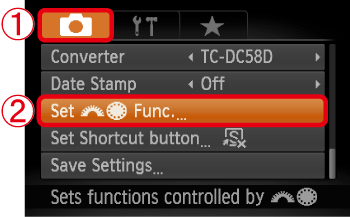
 Operate the <directional buttons> to select the [Shooting] (
 ) tab.
 Operate the <directional buttons> up or down to select [Set
Func.], and then press the <FUNC./SET> button (
Operate the <directional buttons> up or down to select [Set
Func.], and then press the <FUNC./SET> button ( ).
).4. The following window appears.
 Operate the <directional buttons> right or left to select the option you want to register.
NOTE
- The functions you can register to the <front dial> () and <control dial> () are different depending on the shooting mode.
REFERENCE
To register functions in [ - ], follow the procedures below. ([Settings])1. Operate the <directional buttons> up or down to select [ - ].
2. Operate the <directional buttons> up, down, right, or left, or turn the <Control Dial> ().
).3. Turn the <Front Dial> () to set the function you want to register.
) to set the function you want to register.5. Press the <MENU> button () twice to return to the shooting screen.
) twice to return to the shooting screen.| Item | Shooting Mode | ||||
|---|---|---|---|---|---|
[Manual] | [Aperture Priority] | [Shutter Speed Priority]
| [Program]
| ||
| Front Dial 1 | | Tv | Av | Tv |  |
| Av, | | | | |
| Front Dial 2 | | Av | Av | Tv | |
| Tv, | | | | |
| Control Dial | | | | | |
| Tv, Av | Av | Tv | | |
Av : Aperture value, Tv : Shutter speeds
NOTE
[Settings]
- In the settings screen, [step zoom] (
 ), [aspect ratio settings] (
 ), [white balance correction] (
 ) and [i-Contrast] (
 ) can be registered to items with a () in the table below.
 - Functions registered in [Manual] (), [Aperture Priority] (), [Shutter Speed Priority] (), and [Program] (), modes will be set in the same way for [Front Dial 1], [Front Dial 2], and [Control Dial].
- The same function cannot be registered to both the <Front Dial> () and <Control Dial> () when in [Program] () mode.
REFERENCE
When multiple functions are assigned to the <Control Dial> (), you can press the [Evaluative] ( ) button to switch between them.
), you can press the [Evaluative] () button to switch between them.