








Touch Screen Operations (EOS REBEL T4i/EOS 650D)
Solusi
You can operate this camera by touching the LCD monitor (touch panel).
- Use your finger to tap (touch and let go) the LCD monitor.
- By tapping, you can select menus, icons, etc., displayed on the LCD monitor.
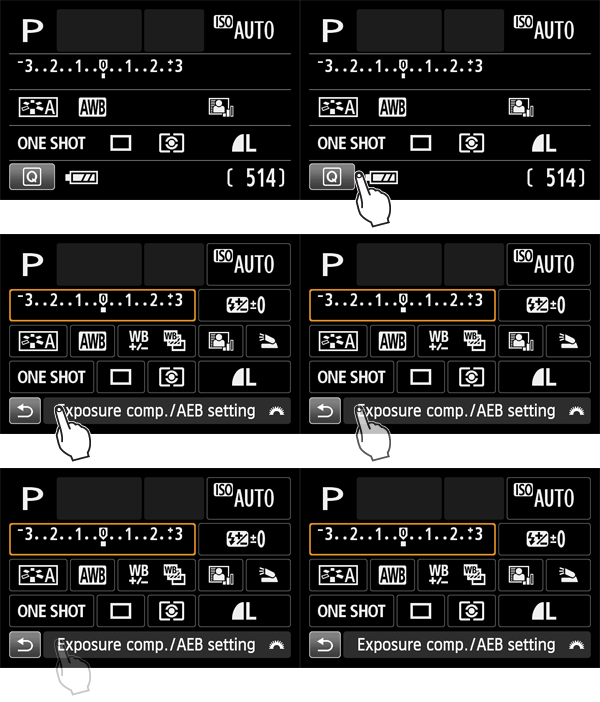
Icons that you can tap are displayed in a frame (excluding the menu screen).
For example, when you tap [  ], the Quick Control screen appears. By tapping [
  ], you can return to the preceding screen.
], the Quick Control screen appears. By tapping [ ], you can return to the preceding screen.
REFERENCE
Operations possible by tapping the screen
- Setting menu functions after pressing the <M> button
- Quick Control
- Setting functions after pressing the <
 >, <
>, <  >, <WB>, <
  >, <
>, <  /
/ >, <AF> button
 - Setting functions during Live View shooting
- Setting functions during movie shooting
- Playback operations
- Slide your finger while touching the LCD monitor.

REFERENCE
Operations possible by dragging your finger on the screen
- Selecting a menu tab or item after pressing the <M> button
- Setting a scale control
- Setting functions during Live View shooting
- Setting functions during movie shooting
- Playback operations (swipe)
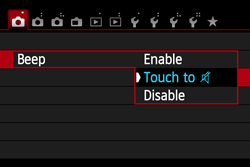
If [  : Beep] is set to [Touch to
  ], the
: Beep] is set to [Touch to ], thebeep will not sound during touch operations.
1. Select [Touch control].
Under the [  ] tab, select [Touch control], then press <SET>.
] tab, select [Touch control], then press <SET>.
2. Set the Touch control.
- Select [Enable].
- Setting it to [Disable] will disable touch operations.

CAUTION
Cautions for Touch Screen Operations
- Since the LCD monitor is not pressure sensitive, do not use any sharp objects such as your fingernail, ballpoint pens, etc., for touch operations.
- Do not use wet fingers for touch screen operations.
- If the LCD monitor has any moisture or if your fingers are wet, the touch screen may not respond or misoperation may occur. In such a case, turn off the power and wipe the LCD monitor with a cloth.
- Do not attach any protective sheet (commercially available) or sticker on the LCD monitor. It may make the touch operation response slow.