








Setting ISO speed (PowerShot SX500 IS / SX160 IS)
Solusi
Raise the [ISO speed] to use a fast shutter speed when you wish to reduce the effects of camera shake or avoid blurry subjects, or to turn the flash off when shooting in a dark area.
CAUTION
- The following explanations are provided based on the assumption that the [Shooting Mode] is set to [Program] (
 ).
). - To set the [ISO Speed], it is necessary to set the [Shooting Mode] to one of the following modes.
- [Manual] ( ), [Aperture Priority] (
 ), [Shutter Speed Priority] (
 ), [Program] ()
), [Aperture Priority] (), [Shutter Speed Priority] (), [Program] ()- The position and shape of the operation buttons, screens displayed, and setting items may differ according to the model you use.
1. Press the <Power> button on the camera.
2. Press the <ISO / Up> ( ) button.
) button.3. The following screen appears on the LCD monitor.
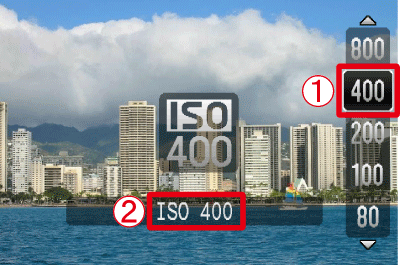
 Press the <ISO / Up> () button repeatedly to display the [ISO speed]* you want to set.
 The [ISO Speed] you selected is displayed on the screen.
* The appropriate [ISO Speed] differs depending on shooting locations. If the camera shake warning icon ( ) appears when you press the <Shutter Button> halfway, it is recommended to gradually raise the ISO speed in increments such as [ISO 100], [ISO 200], etc., and then set the [ISO Speed] when the camera shake warning icon () disappears.
) appears when you press the <Shutter Button> halfway, it is recommended to gradually raise the ISO speed in increments such as [ISO 100], [ISO 200], etc., and then set the [ISO Speed] when the camera shake warning icon () disappears.| Guidelines when changing the ISO speed | |
|---|---|
 | Automatically adjusts the ISO speed to suit the shooting mode and conditions. |
  | For shooting outdoors in fair weather. |
  | For shooting in cloudy conditions, or at twilight. |
 | For shooting night scenes, or in dark rooms. |
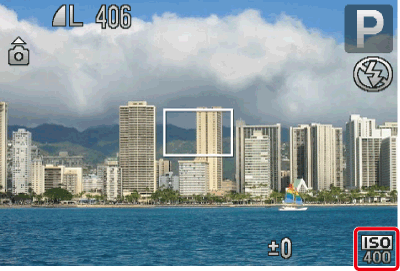
4. If the following icon is shown, the setting is complete (if setting [ISO Speed] to 400).
NOTE
- To view the automatically set ISO speed when the camera is set to [ISO AUTO](), press the shutter button halfway.
- In [Low Light] (
 ), ISO speeds will automatically be set higher than in [AUTO] (
 ) mode, depending on the scene.
CAUTION
- Although choosing a lower ISO speed may reduce image graininess, there may be a greater risk of subject blurriness in some shooting conditions.
- Choosing a higher ISO speed will increase shutter speed, which may reduce subject blurriness and increase the flash range. However, shots may look grainy.