








Possible combinations of shooting functions and shooting modes (PowerShot SX500 IS)
Solusi
If you cannot set certain shooting functions, please check the current shooting mode of your camera. Some shooting functions may not be available in certain shooting modes. For details on the possible combinations of shooting functions and shooting modes, please refer to the following list.
( : Selectable, or set automatically.
  : Not selectable)
: Selectable, or set automatically. : Not selectable)- Functions Available in Each Shooting Mode
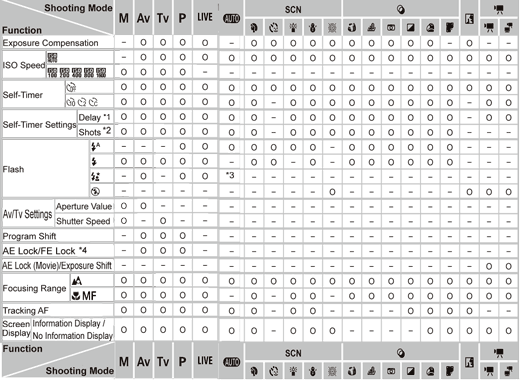
*2:One shot (cannot be modified) in modes without selection of the number of shots.
*3:Not available, but switches to (
 ) in some cases. *4:FE lock not available in (
 ) flash mode.
- Function Settings (
 ) Available in Different Shooting Modes

*2:Set in a range of 1 – 5: contrast, sharpness, color saturation, red, green, blue, and skin tone.
*3:(
 ) is set when in (
 ) , AF Lock, or (
 )
) *4:Only (
 ) and (
 ) are available.
 *5:Synchronizes with the aspect ratio setting and is automatically set.
- Shooting Settings (
 ) Available in Different Shooting Modes

*2:Only available by pressing the(
 )button.
*3:Available when the AF frame is set to [Center].
*4:[On] when subject movement is detected in.(
 ) mode.