








Setting ISO speed (PowerShot SX270 HS / PowerShot SX280 HS)
Solusi
Raise the [ISO speed] to use a fast shutter speed when you wish to reduce the effects of camera shake or avoid blurry subjects, or to turn the flash off when shooting in a dark area.
NOTE
- Although choosing a lower ISO speed may reduce image graininess, there may be a greater risk of subject blurriness in some shooting conditions.
- Choosing a higher ISO speed will increase shutter speed, which may reduce subject blurriness and increase the flash range. However, shots may look grainy.
- To set the [ISO Speed], it is necessary to set the [Shooting Mode] to one of the following modes.
- ,
,  ,
,  ,
, 
, , ,
1. Press the power button to turn the camera on.
2. Press the <FUNC./SET> ( ) button.
) button.3. The following screen appears.
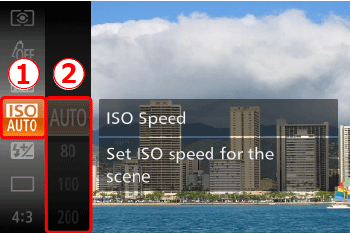
 Press the <
 ><
>< > buttons or turn the <Control dial> to choose [ISO Speed] (
 )
) Press the <FUNC./SET> () or turn the <
 > dial to display the [ISO speed] settings.
4. Choose the desired [ISO Speed].
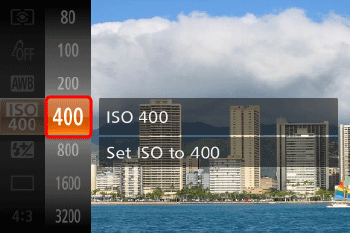
Press the <><> buttons or turn the <Control dial> to select an [ISO Speed]* of your choice.
><> buttons or turn the <Control dial> to select an [ISO Speed]* of your choice.After the selection is made, press the <FUNC./SET> () button.
) button.* Select the appropriate [ISO Speed] for the shooting environment.
If the camera shake warning icon ( ) appears when you press the <Shutter Button> halfway, it is recommended to gradually raise the ISO speed in increments such as [ISO 100], [ISO 200], etc., and then set the [ISO Speed] when the camera shake warning icon (G0035839||3]]) disappears.
) appears when you press the <Shutter Button> halfway, it is recommended to gradually raise the ISO speed in increments such as [ISO 100], [ISO 200], etc., and then set the [ISO Speed] when the camera shake warning icon (G0035839||3]]) disappears.| Guidelines for changing the ISO speed | ||
|---|---|---|
 | Automatically adjusts the ISO speed to suit the shooting mode and conditions. | |
   | Low High | For shooting outdoors in fair weather. |
  | For shooting in cloudy conditions, or at twilight. | |
   | For shooting night scenes, or in dark rooms. | |
5. If the following icon is shown, the setting is complete (if setting [ISO Speed] to 400).
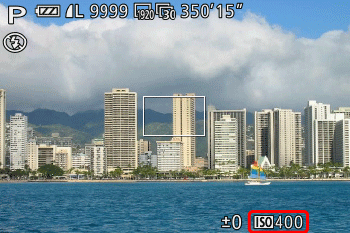
NOTE
To view the automatically set ISO speed when the camera is set to (), press the shutter button halfway.
), press the shutter button halfway.