








Shooting subjects up close (PowerShot SX510 HS / SX170 IS)
Solusi
If you are shooting a subject at a close distance, and if the subject cannot be easily focused within the normal shooting range, switching the normal mode to the [Macro] ( ) mode will make it easier to focus on the subject.
) mode will make it easier to focus on the subject.IMPORTANT
- The following explanations are provided based on the assumption that the [Shooting Mode] is set to [Program AE] (
 )
) - If the flash fires, vignetting may occur.
1. Press the power button to turn the camera on.
2. Press the Left <Directional button> / [Macro] () button.
) button.3. The following screen appears.

Press the <Directional buttons> to select [Macro] ().
).Once the setting is complete, [Macro] () is displayed on the LCD monitor.
) is displayed on the LCD monitor.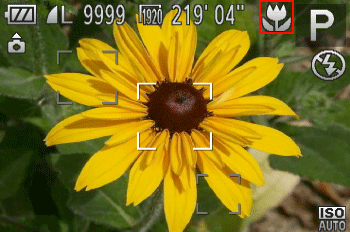
REFERENCE
- To prevent camera shake, try mounting the camera on a tripod and shooting with the camera set to [Self-timer]
The shooting distance for each [Focusing Range] is as shown in the following table (from the end of the lens). If you shoot beyond the following ranges, the subject may be out of focus.
Also, [Macro] cannot be set in some shooting modes. Please see the following table for details.
 ... Macro cannot be set
| Model | Shooting distance | Shooting modes in which [Macro] cannot be set | |
|---|---|---|---|
[Normal]

| [Macro]

|  , ,  , , 
| |
| 5 cm (2.0 in.) – 1.4 m (4.6 ft.)(W)* 1.4 m (4.6 ft.) – infinity (T)** |
0 cm (0.0 in.) – 50 cm (1.6 ft.) (W)* – (T)** | |
|
| 5 cm (2.0 in.) – infinity (W)* 60 cm (2.0 ft.) – infinity (T)** |
1 cm – 50 cm (0.4 in – 1.6 ft.) (W)* – (T)** | |
|
 ) to the maximum wide angle side (Max. wide angle).
** (T): When turning the < Zoom lver > toward (
 ) to the maximum telephoto side (Max. telephoto).