








Changing the Recording Programs according to the situation, such as in dark surroundings (VIXIA mini / LEGRIA mini)
Solusi
The camcorder features a number of shooting modes that offer the most appropriate settings for a variety of special scenes.
1. Set the power switch to ON to turn on the camcorder.

2. Touch the shooting mode button on the top left corner of the screen.
*The button will show the icon of the shooting mode currently selected. ([AUTO] is set in the image below.)
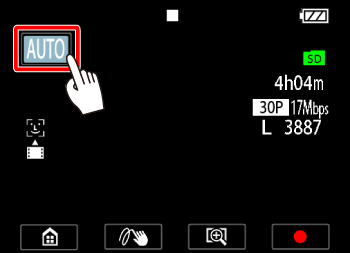
3.  Drag your finger up/down to bring the desired scene mode to the center, and then
  touch [OK].
Drag your finger up/down to bring the desired scene mode to the center, and then touch [OK].
Shooting Modes ( Default value; SCN - special scene shooting mode)
Default value; SCN - special scene shooting mode)
| Shooting Mode | Details |
|---|---|
 Auto | Let the camcorder take care of most of the settings while you concentrate on recording |
 Sports (SCN) | To record scenes with lots of movement, such as sport events and dance scenes. |
 Beach (SCN) | To record on a sunny beach without the subject being underexposed. |
 Macro (SCN) | The camcorder can focus at a shorter distance, allowing you to get closer shots of flowers or insects. Close subjects will also stand out more because of the fisheye effect of the ultra wide angle lens. |
 Food and Fashion (SCN) | To record fashion or food related scenes with vivid colors. |
 Night Scene (SCN) | To record nightscapes with lower noise. |
 Snow (SCN) | To record in bright ski resorts without the subject being underexposed. |
 Programmed AE | The camcorder automatically sets the shutter speed and aperture but you have the option to adjust the white balance and exposure, and change the frame rate |
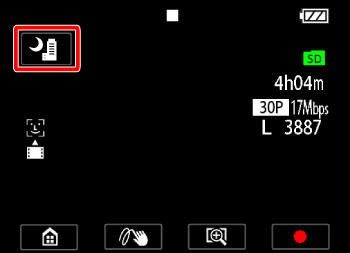
4. The [Special Scene mode] you selected will be displayed.
NOTE
- In [Sports], [Beach], or [Snow] mode, the picture may not appear smooth during playback.
- In [Beach] or [Snow] mode, the subject may become overexposed on cloudy days or in shaded places. Check the image on the screen.
- In [Macro] mode, the camcorder can focus on a subject as close as 20 cm (7.9 in.).
- 'AE' stand for Auto Expoure (exposure will be determined automatically by the camera).