








Changing the Time Zone Settings
Solusi
To ensure that your shots will have the correct local date and time when you travel abroad, simply register the destination in advance and switch to that time zone. This convenient feature eliminates the need to change the Date/ Time setting manually.
IMPORTANT
- Before using the world clock, be sure to set the date and time and your home time zone,
- The position and shape of the operation buttons, screens displayed, and setting items may differ according to the model you use.
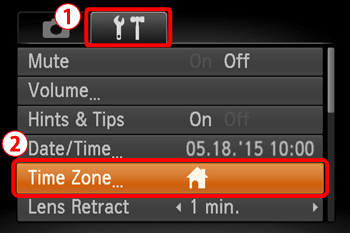
1. Press the <Power> button to turn the camera on.
2. Press the <MENU> button.
3. Press the [  ], [
], [  ] buttons to select the
  [Set up] (
 ) tab.
], [ ] buttons to select the [Set up] () tab. Press the [  ], [
], [  ] buttons to select
  [Time Zone].
], [ ] buttons to select [Time Zone].Press the <FUNC./SET> ( ) button.
) button.
4. When setting the time zone for the first time, the following screen appears.
Confirm that [Home] ( ) is selected, and then press the <FUNC./SET> () button.
) is selected, and then press the <FUNC./SET> () button.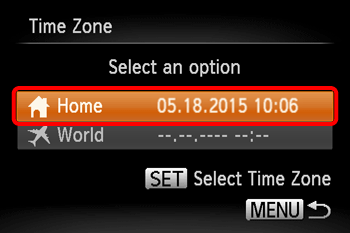
5. Press the [ ], [ ] buttons to select the home time zone ([Tokyo] is selected in the above image).
], [ ] buttons to select the home time zone ([Tokyo] is selected in the above image).Press the <FUNC./SET> () button.
) button.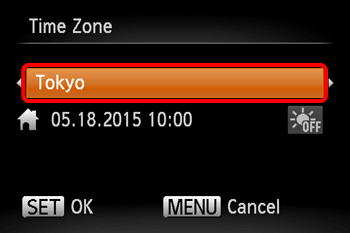
6. Press the [ ], [ ] buttons to select the [World] ( ).
).
], [ ] buttons to select the [World] ().Press the <FUNC./SET> () button.
) button.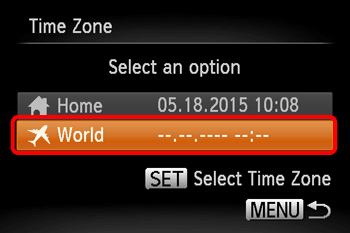
7. Press the [ ], [ ] buttons to select the world time zone ([London] is selected in the image below).
], [ ] buttons to select the world time zone ([London] is selected in the image below).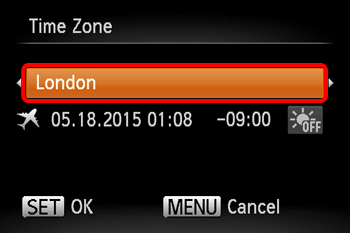
8. For countries or regions to which the daylight saving time applies, you can set the daylight saving time.
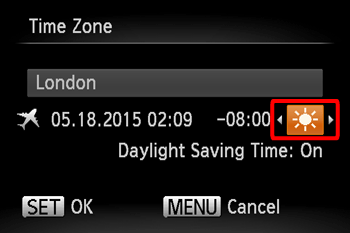
To set daylight saving time (one hour ahead), press the [ ], [ ] buttons to choose [Daylight Saving Time] ( ).
).
], [ ] buttons to choose [Daylight Saving Time] (). [Daylight Saving Time: On] is displayed on the screen when daylight saving time has been set.
After the settings are completed, press the <FUNC./SET> () button.
) button.The [Time Zone] settings for your home and destination are now complete.
9. Switch the time zone to the world time zone.
Press the [ ], [ ] buttons to set [Time Zone] to [World] (). After the settings are completed, press the <MENU> ( ) button.
], [ ] buttons to set [Time Zone] to [World] (). After the settings are completed, press the <MENU> () button.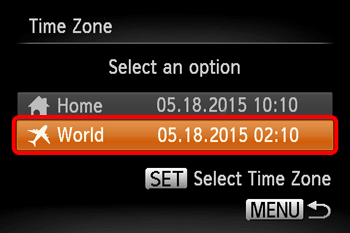
10. The following screen appears.
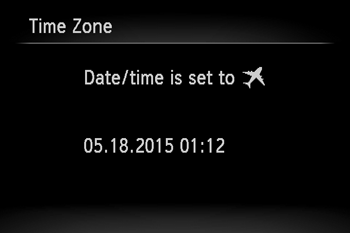
11. Confirm that [Time Zone] is set to [World] ().
).Press the <MENU> button.
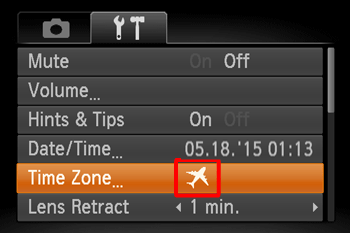
12. The following screen appears.
If [World] () appears on the screen, [Time Zone] is set to the world time zone.
) appears on the screen, [Time Zone] is set to the world time zone.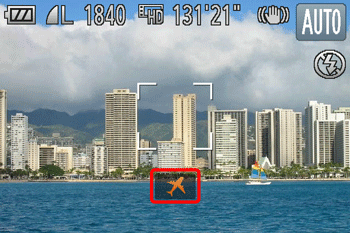
NOTE
- Adjusting the date or time while in [World] () mode will automatically update your [Home] () time and date.