








Name of components and information displayed on the screen (PowerShot G3 X)
Solusi
PowerShot G3 X

 | Lens |  | External microphone IN terminal |
 | Lamp |  | [  (Flash pop up)] switch (Flash pop up)] switch |
 | Zoom lever Shooting: [  (telephoto)] / [ (telephoto)] / [  (wide angle)] (wide angle)]Playback: [  (magnify)] / [ (magnify)] / [  (index)] (index)] |  | Headphone jack |
 | Shutter button |  |  (N-Mark)* (N-Mark)* |
 | Movie button |  | Wi-Fi antenna area |
 | Strap mount |  | [  (Manual focus) ] button (Manual focus) ] button |
 | Front dial |  |  (Framing Assist – Seek)] button (Framing Assist – Seek)] button |
 | Exposure compensation dial |  | Continuous ring |
 | Power button |  | Tripod socket |
 | Mode dial |  | Memory card/battery cover |
 | Flash |  | DC coupler terminal cover |
 | Microphone |

| Screen (LCD monitor)* | | Control dial |
| Hot shoe / Hot shoe cap | | [  (Display) ] / Down button (Display) ] / Down button |
| [  (Mobile Device Connection) ] button (Mobile Device Connection) ] button | |  / /  (Single-image erase)> button (Single-image erase)> button |
| Indicator | | [  (AF frame selector) ] / [ (AF frame selector) ] / [  ] button ] button |
| Remote switch terminal | | [  ] button ] button |
| DIGITAL terminal | | [  (Quick Set menu/Set)] button (Quick Set menu/Set)] button |
| HDMI (TM) terminal | | [ (Flash) ] / Right button |
| [  (Shortcut) ] button (Shortcut) ] button | | [  (ONE SHOT / SERVO)] / [ (ONE SHOT / SERVO)] / [  (Drive mode)] / [ (Drive mode)] / [  (Story Highlights)] / Down button (Story Highlights)] / Down button |
| [  (Playback) ] button (Playback) ] button | | Speaker |
| [  (Wi-Fi) ] / [ (Wi-Fi) ] / [  (ISO speed) ] / Up button (ISO speed) ] / Up button | | Serial number (Body number) |
| [  (Macro)] / Left button (Macro)] / Left button |

| Shooting mode, Scene icon | | Quick Set menu |
| Flash mode | | Focus range, AF lock |
| Flash exposure compensation / Flash output level | | AF frame, Spot AE point frame |
| Shadow correction | | Shutter speed |
| Metering method |  | Aperture value |
| Eco mode |  | Electronic level |
| ND filter |  | Exposure level |
| Self-timer |  | ISO speed |
| Drive mode, AEB shooting, Focus bracketing |  | Grid lines |
| Mercury lamp correction, White balance |  | DR correction |
| My Colors |  | Hybrid Auto mode |
| IS mode icon |  | Touch Shutter |
| Battery level |  | Camera shake warning |
| Still image compression, Recording pixel setting |  | Zoom bar |
| Recordable shots* |  | Audio recording mode |
| Zoom magnification, Digital tele-converter |  | Time zone |
| Movie quality |  | Image stabilization |
| Remaining time |  | MF indicator |
| Histogram |  | Exposure compensation |
 ] mode, indicates the number of shots available.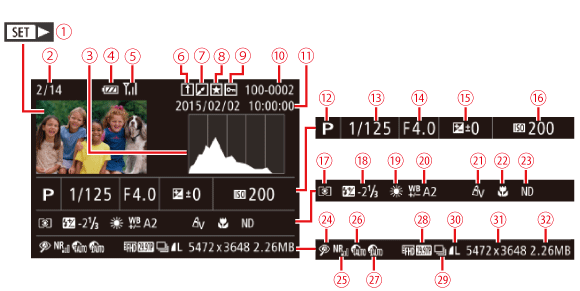
NOTE
- Some information may not be displayed when viewing images on a TV.
| Movies | | Metering method |
| Current image no. / Total no. of images | | Flash, Flash exposure compensation |
| Histogram | | White balance |
| Battery level | | White balance correction, Mercury lamp correction, Creative Shot effect |
| Wi-Fi signal strength | | My Colors |
| Image Sync | | Focus range |
| Image editing, Movie compression | | ND filter |
| Favorites | | Red-eye correction, Short clip playback effect |
| Protection | | High ISO NR |
| Folder number - File number | | DR correction |
| Shooting date/time | | Shadow correction |
| Shooting mode | | Image quality / Frame rate (movies) |
| Shutter speed | | Group playback |
| Aperture value | | Compression (image quality) / Resolution, Digest movies, RAW, MP4 (movies), Albums |
| Exposure compensation level | | Still images: Recording pixel setting Movies: Playback time |
| ISO speed | | File size |