








Displaying shooting information during playback
Solusi
IMPORTANT
The position and shape of the operation buttons may differ depending on the model you use.
1. Set the camera’s power switch to [ON].
2. Press the [  ] button to play back your images.
] button to play back your images.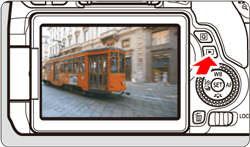
The last captured image or last image played back will appear.
3. Press the [  ], [
], [  ] keys to select the desired image.
], [ ] keys to select the desired image.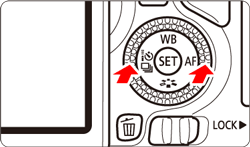
- To play back images starting with the last image captured, press the [ ] button.
- To play back images starting with the first captured image, press the [ ] button.
4. Press the [INFO.] buton.

Each time you press the [INFO] button, the information display will change.
 : No information
  : Basic information display
  : Shooting information display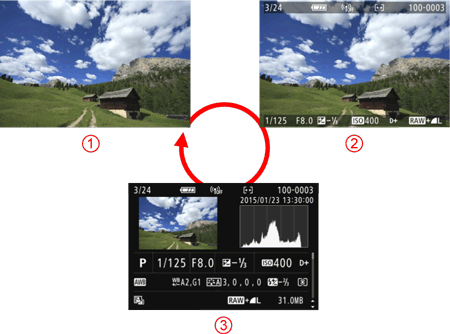
REFERENCE
Shooting Information Display
With the shooting information screen displayed, you can press the [  ], [
], [  ] keys to change the shooting information displayed at the screen’s bottom as follows.
], [ ] keys to change the shooting information displayed at the screen’s bottom as follows.Detailed information <-> Lens / Histogram information <-> White balance information <-> Picture Style information <-> Color space / Noise reduction information <-> Lens aberration correction information <-> GPS information <-> Detailed information
- The information displayed varies depending on the shooting mode and settings.
- If GPS information was not recorded for the image, the GPS information screen will not be displayed.
Detailed shooting information is shown below:
Sample Still Photo Taken in a Creative Zone Mode
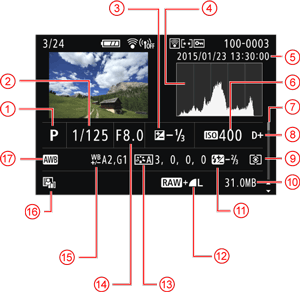
 | Shooting mode |  | File size |
 | Shutter speed |  | Flash exposure compensation amount / Multi Shot Noise Reduction |
 | Exposure compensation amount |  | Image-recording quality |
 | Histogram (Brightness/RGB) |  | Picture Style/Settings |
 | Shooting date and time |  | Aperture |
 | ISO speed |  | White balance correction |
 | Scroll bar |  | Auto Lighting Optimizer |
 | Highlight tone priority |  | White balance |
 | Metering mode | ||
* With  +
+  images, the file size is displayed.
+ images, the file size is displayed.* During flash photography without flash exposure compensation, [  ] will be displayed.
] will be displayed.* [  ] will be displayed for images shot with Multi Shot Noise Reduction.
] will be displayed for images shot with Multi Shot Noise Reduction.* For still photos taken during movie shooting, [  ] will be displayed.
] will be displayed.* If a Creative filter or resizing is applied to the image and then saved, [  ] will be displayed.
] will be displayed.* For cropped images, [ ] and [  ] will be displayed.
] and [ ] will be displayed.IMPORTANT
If the image was taken by another camera, certain shooting information may not be displayed.