








[!] is displayed in the viewfinder (EOS 5DS / EOS 5DS R)
Solusi
When any of the following functions are set, the [  ] (warning icon) can be displayed in the viewfinder
] (warning icon) can be displayed in the viewfinder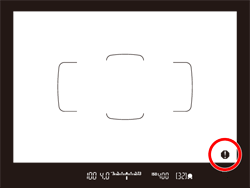
When monochrome  is set is set | If the Picture Style is set to [Monochrome] , the warning icon will appear. |
| When WB is corrected | If white balance correction is set, the warning icon will appear |
| When one-touch image quality is set | If you change the image-recording quality with the one-touch image quality function, the warning icon will appear. |
When  is set is set | If [  : High ISO speed NR] is set to [Multi Shot Noise Reduction], the warning icon will appear. : High ISO speed NR] is set to [Multi Shot Noise Reduction], the warning icon will appear. |
| When spot metering is set | If the metering mode is set to [Spot metering], the warning icon will appear. |
- The viewfinder [ ] (warning icon) can be displayed or hidden using the following procedure.
1. 1. Set the camera’s power switch to [ON].
2. Press the [MENU] button to display the menu screen.

3. Press the [  ] button and select the [
  ] tab.
] button and select the [ ] tab.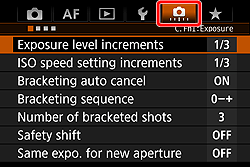

4. Turn the [  ] dial to select the [
  ] tab.
] dial to select the [ ] tab.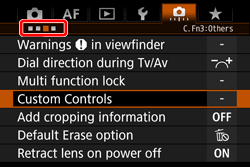

5. Turn the [  ] dial to select [Warnings in viewfinder], then press [
  ].
].
] dial to select [Warnings in viewfinder], then press [ ].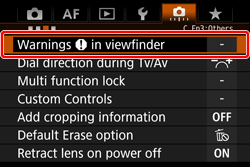

6. When the screen shown in the image below appears, turn the [ ] dial to select the desired function, then press [ ] to append a [  ]. To disable display, remove the [ ].
] dial to select the desired function, then press [ ] to append a [ ]. To disable display, remove the [ ].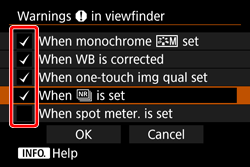
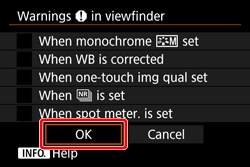
7. After you have completed the setting, select [OK] and press [ ].
].
NOTE
If you set any of the checkmarked [ ] functions, [ ] will also appear for the respective setting displayed on the Quick Control screen and Custom Quick Control screen
] functions, [ ] will also appear for the respective setting displayed on the Quick Control screen and Custom Quick Control screenThis concludes the procedure for changing the display settings for [ ].
].