Compatible Remote Controllers (Movies / Still Photos) (EOS 80D)
Solusi
NOTE
Icons in this Article
[  ]: Self-timer - Shoot in 10 sec.
]: Self-timer - Shoot in 10 sec.[  ]: Self-timer - Shoot in 2 sec.
]: Self-timer - Shoot in 2 sec.< >: Main Dial
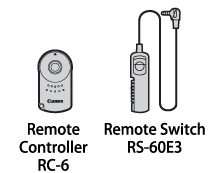
>: Main DialYou can use accessories such as Remote Controller RC-6 (sold separately) and Remote Switch RS-60E3 (sold separately) to shoot photos with this camera.
NOTE
- For instructions on how to use an accessory, refer to the accessory's user manual.
- Remote control shooting is also possible with an EX-series Speedlite equipped with a remote-release function.
- You can also use Remote Controller RC-1 and RC-5 (sold separately).
- You can also use remote control when shooting movies.

With Remote Controller RC-6 (sold separately), you can shoot remotely up to approx. 5 meters/16.4 feet away from the camera. You can either shoot immediately or with a 2-sec. delay.
1. Set the camera's power switch to <ON>.
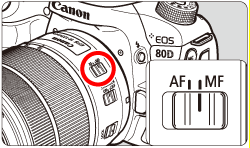
2. Focus on the subject, and set the lens's focus mode switch to <MF>.
- You can also shoot with <AF>.
3. Press the <DRIVE> button.

4. Look at the LCD panel and turn the <> dial to select <> or <>.
> dial to select <> or <>.
5. Point the remote controller toward the camera's remote control sensor, and press the transmit button.
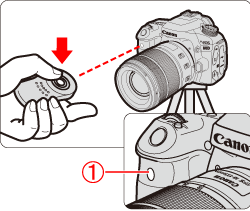
 Remote control sensor
6. When focus is achieved, the self-timer lamp lights up and the picture is taken.
IMPORTANT
- Fluorescent or LED lighting may cause camera misoperation by triggering the shutter inadvertently. Try to keep the camera away from such light sources.
- If you point a remote controller for a TV set toward the camera and operate it, it may cause camera misoperation by triggering the shutter inadvertently.
- If flash light is emitted from a flash on another camera around this camera, it may cause camera misoperation by triggering the shutter inadvertently. Do not expose the remote control sensor to flash light from a flash on another camera.
NOTE
Shooting Movies
You can start or stop movie shooting using Remote Controller RC-6 (sold separately).
Set the release mode switch to <2> (2-sec. delay), then press the transmit button to start movie shooting. If the switch is set to <●> (immediate shooting), a still photo will be shot.
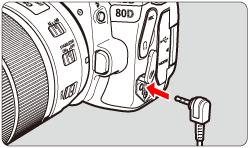
This camera supports Remote Switch RS-60E3 (sold separately) with a cord length of approx. 60 cm (2.0 ft.). You can connect it to the remote control terminal on this camera, and perform halfway/complete press operations the same way as with the shutter button.
1. Open the terminal cover.
2. Connect the plug to the remote control terminal.