








Clean the Interior of the Machine
Solusi
Clean the machine’s print area periodically to prevent toner powder and paper dust from accumulating inside.
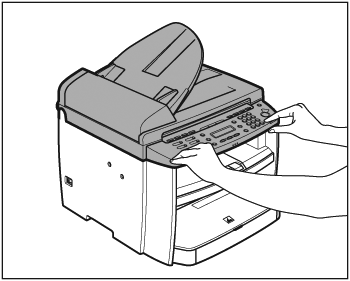
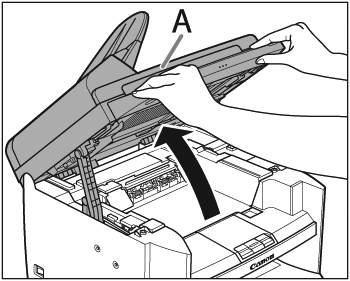

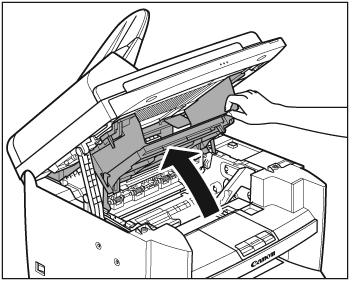
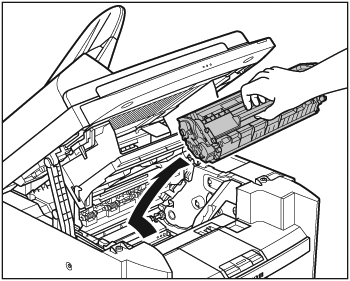
CAUTION
- Do not touch the rollers and parts which have labels "CAUTION! Hot surface avoid contact" on. They become very hot during use.
- To avoid exposing the toner cartridge to light, place it in its protective bag or wrap it in a thick cloth.
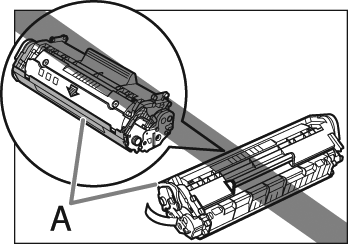
- Do not open the drum protective shutter (A) on the toner cartridge. Print quality may deteriorate if the drum surface is exposed to light or is damaged.
NOTE
Always hold the toner cartridge by its handle.
7. Use a clean, soft, dry, lint-free cloth to remove any toner or paper debris from the machine’s interior.
CAUTION
- Do not touch the fixing assembly (A) as it becomes very hot during use.
- Do not touch the transfer roller (B) as this can damage the machine.
- If loose toner comes into contact with your skin or clothing, wash with cold water. Warm water will set the toner.

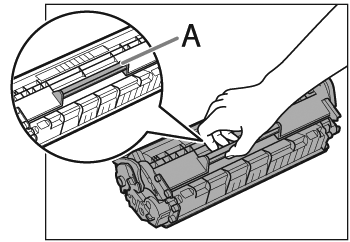
Hold the toner cartridge by its handle (A).
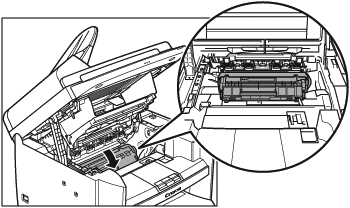
9. Insert the toner cartridge so that the protrusion on the right side of the toner cartridge (A) fits into the guide (B) located on the right side of the machine and slide it down parallel to the guide.



CAUTION
- Be careful not to get your fingers caught.
- If you cannot close the toner cover, do not force it to close. Open the cover and make sure the toner cartridge is properly set in the machine.