








Checking the Ink Status
Solusi
You can check the ink status on the LCD.
NOTE
- The ink level detector is mounted on the machine to detect the remaining ink level. The machine considers as ink is full when a new FINE Cartridge is installed, and then starts to detect a remaining ink level. If you install a used FINE Cartridge, the indicated ink level of it may not be correct. In such case, refer to the ink level information only as a guide.
- When remaining ink cautions or errors occur, the message will appear to inform you of the error. Refer to [ An Error Message Is Displayed on the LCD ]
1. Make sure that the power is turned on, and press the Setup button.
2. Select Display remaining ink level  , and press the OK button.
, and press the OK button.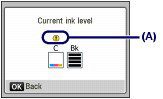
Example: (A)
The ink is running low. Prepare a new ink cartridge.
NOTE
- You can also check the ink status on a screen of the LCD displayed while printing.