








Checking the amount of the memory cards that is currently in use
Solusi
This section explains the procedure to check the amount of the memory cards that is currently in use.
1. Set the mode switch to <M> or <CINEMA>.

2. Turn on the camcorder.
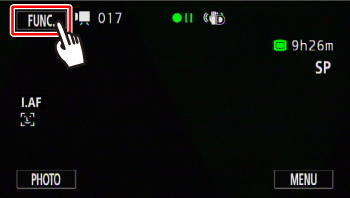
3. Touch [  ].
].
].
4. Touch [MENU].

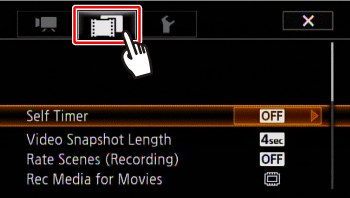
5. Touch [  ].
].
].
6.  Drag your finger up and down bring [Memory Info] into the orange selection bar,
  and touch inside the frame on the right.
Drag your finger up and down bring [Memory Info] into the orange selection bar, and touch inside the frame on the right.
7. Touch [  ] (memory card A) or [
  ] (memory card B).
] (memory card A) or [ ] (memory card B).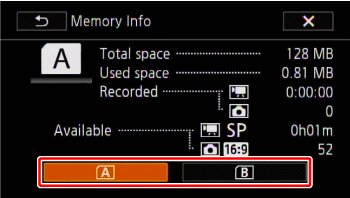
8. Check the memory information, such as the total space.
The following screen appears when you select [Card B].
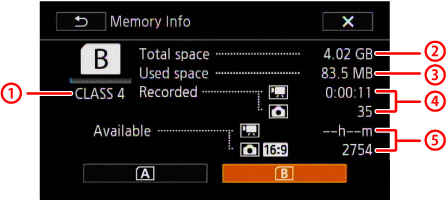 SD Speed Class Total space
 Used space
 Total recording time / total number of photos
 Available recording time / number of available photos
NOTE
- The values are calculated based on the video mode and size of photos (1920×1080) currently set.