








How do I shoot movies? (PowerShot A800)
Solusi
The details on how to shoot movies are described below.
You can press the <Shutter Button>, and the camera will start recording movies automatically.
Please note that if movies are shot over a long period of time, the temperature of the camera may increase. This is not a malfunction.
IMPORTANT
- Do not touch the <Microphone> during shooting. If buttons other than the <Shutter Button> are operated during shooting, the operation sound will also be recorded.
- The optical zoom cannot be used during movie-recording. You can use the digital zoom, but images may appear coarse.
1. Press the <Power> button on the camera.
2. Press the <Mode> ( ) button.
) button.3. The following screen appears.

Operate the <directional button> to select the [Movie] ( ) menu.
) menu.After making a selection, press the <FUNC./SET> ( ) button.
) button.4. The following screen appears.

The maximum shooting duration appears on the [LCD Monitor].
5. Hold the camera facing the subject, and press the <Zoom Button> to decide the size at which you want to capture the subject.
6. Press the <Shutter Button> halfway to focus. When the camera focuses, it beeps twice.
7. Press the <Shutter Button> fully to start shooting.
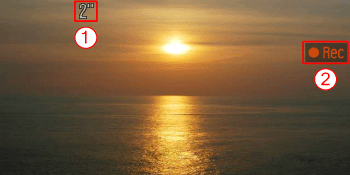
When the camera starts shooting,  [Elapsed Time] and
  [Rec] appear on the [LCD Monitor].
[Elapsed Time] and [Rec] appear on the [LCD Monitor].Once shooting begins, take your finger off the <Shutter Button>.
If you change the composition of your shot during shooting, the focus will stay the
same, but the brightness and tone will automatically adjust.
8. Press the <Shutter Button> again to stop shooting.

NOTE
- The camera will beep once and stop shooting the movie.
- The movie will record to the memory card.
- Shooting will automatically stop when the memory card fills.
- Recording may stop even if the maximum clip length has not been reached on some memory cards. SD Speed Class 4 or higher memory cards are recommended.