








Specifications
| The machine specifications are subject to change without prior notice due to improvements of the machine. |
Machine Specifications
*2 The value indicates the mass of the main unit including toner cartridges. *3 Indicates that the sound pressure level of each bystander position is below the ISO 7779 absolute criteria for the background noise level. |
||||||||||||||||||||||||||||||||||||||||||||||||||||||||||||||||||||||||||||||||||||||||||||||||||||||||||||||||||||||||||||||||||||||||||||||||||||||||||||||||||||||||||||||||
 : Available
  : Unavailable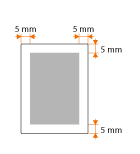
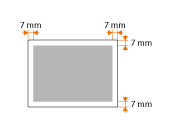

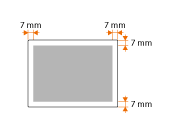
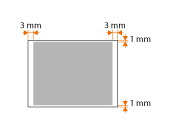
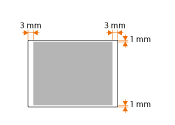
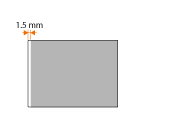

Wireless LAN Specifications
|
||||||||||||||||
Copy Specifications
|
||||||||||||||
Fax Specifications
*2 Based on ITU-T (ITU Telecommunication Standardization Sector) Standard Chart No. 1, JBIG standard mode. |
||||||||||||||||||||||||
Scanner Specifications
|
||||||||||||
Printer Specifications
*2 The print speed on A4 size plain paper is measured during continuous printing. However, this varies depending on the use conditions and environment of the machine. *3 May vary depending on the output environment. |
||||||||||||||||||
Specifications for E-Mail Sending/I-Faxes Sending and Receiving
|
||||||||||||||||||
Specifications for Scanning to Shared Folders/FTP Server
|
||||||||||||||||||
Optional Items
The functionality of the machine can be fully utilized by using the optional items described below. Optional items can be purchased from the retail outlet where you purchased the machine or from your local Canon dealer. Paper Feeder Unit PF-45 Paper Feeder Unit PF-45This is a paper feeder capable of holding a maximum of 500 sheets. Installing this paper feeder enables you to load up to 1,600 sheets of paper of different sizes at a time and in such manner that a size is loaded in the standard drawer, another size in the multi-purpose tray, and still another in this optional paper feeder. This surely reduces the time and labor for paper replacement.
|
|||||||||||||||||||||||||||||||||||||||||||||||||||||||||||||||||||||||||||||||||||||||||||||||||||||
|
HANDSET-J1 This is a handset that can be connected to the machine. Use the handset when you use the machine as a telephone. Also, use the handset when you send or receive faxes manually. Copy Card Reader-F1The card control system simplifies the logon process of Department ID Management by using the control card instead of entering the department ID. You can log on to the machine by inserting a control card and log off by removing it.
|
||||||||||||||