








Specifying the Setting for SP.PRINT ADJ A
Solution
1. Move to the printer, then press [Online] on the control panel.
The Online indicator goes off, allowing you to specify the settings on the control panel.
2. Press [Settings].

3. Select USER MAIN. using [  ] and [
  ], then press [OK].
] and [ ], then press [OK].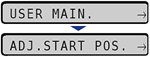
The item for USER MAIN. is displayed.
4. Select SP.PRINT ADJ A using [ ] and [ ], then press [OK].
] and [ ], then press [OK].5. Specify the setting for SP.PRINT ADJ A using [ ] and [ ], then press [OK].
] and [ ], then press [OK].Depending on the paper type or the operating environment, vertical streaks may appear on the printed paper.
In this case, specify MODE 2 for this item.
If the problem is not solved by specifying MODE 2, specify MODE 3.
If the problem is not solved by specifying MODE 3, specify MODE 4.
IMPORTANT
- Resetting the setting to MODE 1 due to change in paper type or operating environment may also avoid vertical streaks appearing on the printed paper. In this case, specify MODE 1.
- Vertical streaks are alleviated by specifying MODE 2, MODE 3, or MODE 4. However, this decreases print density compared to when MODE 1 is specified. This may also make outlines appear to be blurred or slightly jagged.