








How do I Direct Print? (Display on the LCD monitor / PictBridge)
Solution
Connect the camera to the printer and print directly from the camera
CAUTION
- To select items from the camera's LCD monitor, press the button to the left, right, top, or bottom
 , and then press the <FUNC./SET> button
  to specify the item.

- Screens or menu listings may differ depending on the model being used.
- As the actual locations of buttons / switches on cameras vary depending on the camera model, the illustrations that appear on this page may differ from your camera.
- These instructions show how to print one image on one sheet of paper as an example.
1. Connect the camera to the printer.
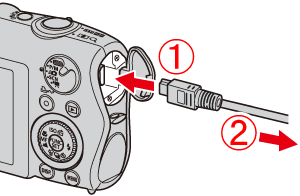 Connect the [interface cable] to the camera's DIGITAL terminal. Connect the other end of the cable to printer's USB terminal.
2. Turn the printer's power on.
3. Press the camera's <Playback> ( ) button.
) button.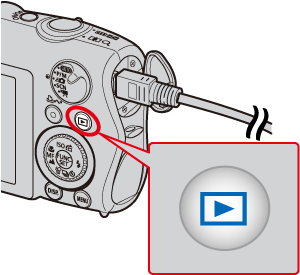
4. Display an image to print on the LCD monitor.

Make sure that the [SET] icon is displayed in the upper left corner of the LCD monitor, and then press the camera's <FUNC./SET> ( ) button.
) button.5. The screen for specifying the print settings appears.
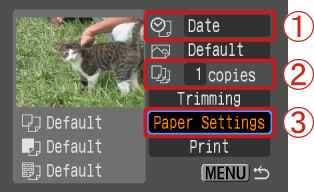 Select [Date] for adding the date. Specify the number of prints.
 Select [Paper Settings], and then press the camera's <FUNC./SET> () button.
6. The screen for setting the paper size appears.
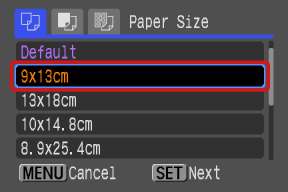
Select the paper size, then press the camera's <FUNC./SET> () button. In the image shown above, the [9 x 13 cm] size is selected.
) button. In the image shown above, the [9 x 13 cm] size is selected.7. The screen for setting the paper type appears.
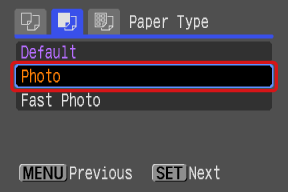
Select the paper type, and then press the camera's <FUNC./SET> () button. In the image shown above, [Photo] is selected.
) button. In the image shown above, [Photo] is selected.8. The layout (border) settings screen appears.
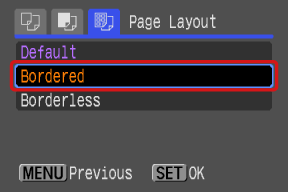
Select the layout type, and then press the camera's <FUNC./SET> () button. In the image shown above, [Bordered] is selected.
) button. In the image shown above, [Bordered] is selected.9. Return to the print setting screen.
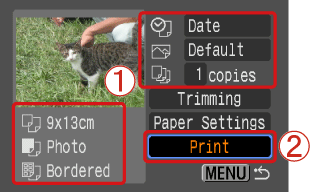 Make sure that the settings are correct. Select [Print] and press the camera's <FUNC./SET> () button to start printing.