If You Want to Connect the Printer and Computer with a USB Cable
Solution
1. Make sure that the printer and computer are off.
2. Connect the B-type (square) end of the USB cable to the USB connector on the printer.
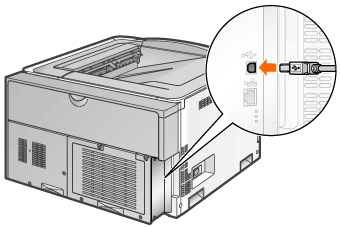
3. Connect the A-type (flat) end of the USB cable to the USB port on the computer.

IMPORTANT
Do not plug or unplug the USB cable while the printer or computer is on.
- This may cause the printer to malfunction.
About unidirectional communication equipment
- The printer performs bi-directional communication. Operation of the printer when connected via unidirectional communication equipment has not been tested, and as a result, Canon cannot guarantee printer operation if the printer is connected using unidirectional print servers, USB hubs or switching devices.
NOTE
About the USB cable
- When you connect this printer to your computer with a USB cable, use the supplied USB cable or a USB cable with the following symbol.