








Connecting the Camcorder to a Computer (XF105/XF100)
Solution
To connect the camcorder to a computer, use a mini-B type USB cable such as the separately sold interface cable IFC-400PCU.
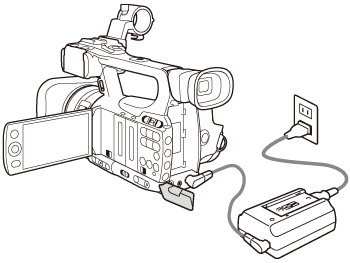
1. Power the camcorder using the compact power adapter.
2.  Insert a CF card into the camcorder, and then
 turn the camcorder on in <MEDIA> mode.
Insert a CF card into the camcorder, and then turn the camcorder on in <MEDIA> mode.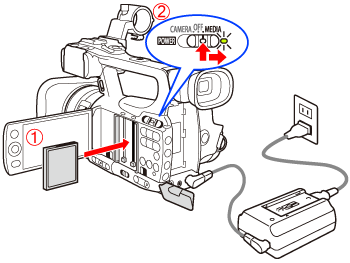
3. Connect the camcorder to the computer using a USB cable.

The camcorder is automatically recognized by the computer.
IMPORTANT
- Please observe the following precautions. Failing to do so may result in permanent data loss.
- While a CF card is connected to the computer:
- Do not remove the CF card or the CF card reader while editing or accessing the clips on the CF card.
- Do not access, change or delete any of the CF card’s folders or files directly from the computer.
- When the camcorder is connected directly to the computer:
- Do not open any of the CF card slot covers and do not remove the CF cards.
- Do not disconnect the USB cable.
- Do not turn off the camcorder or the computer.