








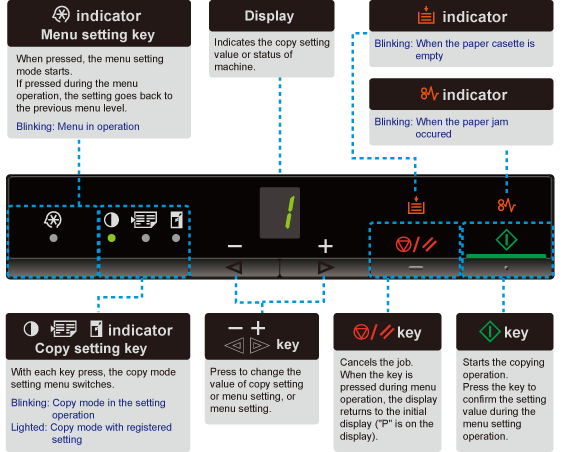
Operation Panel and Indicator Display
Solution
NOTE
When [  ], [
], [  ], and [
  ] are on at a time
], [ ], and [ ] are on at a time- A service error is occurring.
Copy settings, menu setting items, or setting values are displayed.
[ Setting List ]
Also, they are displayed according to the printer status as follows.
| Display | Status |
 | ・ Printing ・ Printing the User Data List ・ Cleaning ・ Updating the firmware ・ Scanning |
 | Cancellation is processing after the [  ] key was pressed. ] key was pressed. |
 | Sleep state |
 | The toner cover is open. |
 | A service error has occurred. |
 | ・ Resetting the settings ・ Setting value limit display (For each copy setting, the display turns off when an attempt is made to exceed the upper or lower setting limits by pressing the [ + ] or [ - ] keys.) |