








How to specify the setting for SPECIAL MODE J
Solution
Specifies whether the printer should stop printing, displaying the message <41 CHK PAPER SZE> or continue printing when SLOT PAPER SIZE, CASSETTE1 SIZE, or CASSETTE2 SIZE is set to MIXED SIZES.
1. Move to the printer, then press  on the control panel.
on the control panel. The  (Online) indicator goes off, allowing you to specify the settings on the control panel.
(Online) indicator goes off, allowing you to specify the settings on the control panel.2. Press  .
.
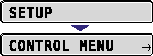
. 
3. Select USER MAIN. using  and , then press
  .
.
and , then press . 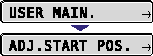
4. Select SPECIAL MODE J using and , then press .
and , then press . 5. Specify the setting for SPECIAL MODE J using and , then press .
and , then press .