








Onscreen Icons and Displays (XA25 / XA20)
Solution

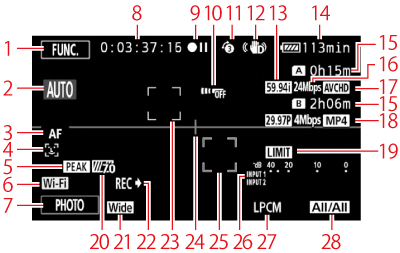
 | Control button [FUNC.]: Open the FUNC. panel |  | Remaining recording time*3 / /  On the memory card On the memory card / /  Relay recording Relay recording |
 | Smart AUTO |  | Recording mode |
 | Autofocus mode |  | Movie format |
 |  Face detection; Face detection; Autofocus only for faces Autofocus only for faces |  | Frame rate, recording mode and movie format for dual recording*4 |
 | Peaking |  | Audio peak limiter |
 | Wi-Fi Remote function |  | Zebra pattern |
 | Control button [PHOTO]: Take a photo |  | Conversion lens (Wide attachment shown) |
 | While recording/during playback: Time code (hours : minutes : seconds : frames) |  | Recording command |
 | Operation*1 |  | Face detection frame |
 | Remote sensor off |  | Level marker |
 | Pre-recording; Video snapshot length Video snapshot length |  | Tracking frame |
 | Image stabilizer |  | Audio level indicator (INPUT terminals) |
 | Frame rate |  | Linear PCM audio |
 | Remaining battery time*2 |  | Audio channel |
*1  :Record,
  :Record pause,
  :Playback,
  :Playback pause,
  :Fast playback,
  :Fast reverse playback,
  :Slow playback/Slow reverse playback,
  : Frame advance/Frame reverse.
:Record, :Record pause, :Playback, :Playback pause, :Fast playback, :Fast reverse playback, :Slow playback/Slow reverse playback, : Frame advance/Frame reverse.*2 The icon shows a rough estimate of the remaining charge as a percentage of the full charge of the battery pack. The remaining recording/playback time of the battery pack is displayed, in minutes, next to the icon.

- When the battery charge becomes low,
 will appear in yellow. When the battery pack is exhausted,
  will appear in red. Replace or charge the battery pack.
 - When you attach an empty battery pack, the power may turn off without displaying .
- Depending on the conditions under which the camcorder and the battery pack are used, the actual battery charge may not be indicated accurately.
- When the camcorder is off, press B to display the charge status of a battery pack.
The Intelligent System will display the charge status (as a percentage) and the remaining recording time (in minutes) for 5 seconds. If the battery pack is exhausted, the battery information may not be displayed.
*3 •When there is no more free space on a memory card, [ End] (memory card A) or [ End] (memory card B) will be displayed in red and the recording will stop.
End] (memory card A) or [ End] (memory card B) will be displayed in red and the recording will stop.- During slow & fast motion recording mode, the shooting frame rate and playback frame rate will be displayed.
*4 When dual recording is activated, information for both memory cards will be displayed.
-
 mode
mode

-
 mode
mode
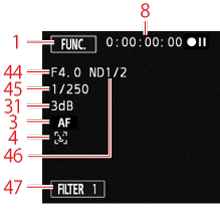
 | Recording program Infrared mode Infrared mode Infrared light on/off Infrared light on/off |  | Audio scene select |
 | Exposure compensation |  | External audio input from the MIC terminal |
 | AGC limit; Gain (during the [Manual Exposure] recording program) |  | Digital tele-converter |
 | Manual focus |  | Microphone attenuator |
 | Backlight correction |  | Audio level indicator (built-in microphone/MIC terminal) |
 | White balance |  | Aperture value |
 | GPS |  | Shutter speed |
 | Image effects |  | ND filter |
 | Slow & fast motion recording (shooting frame rate/playback frame rate) |  | Control button [FILTER 1]: Cinema-look filters |
 | Wind screen |

 | Playback control buttons |  | Data code |
 | Scene number |  | Volume controls |
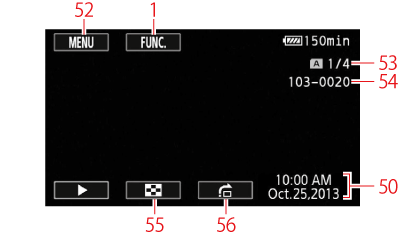
 | Control button [MENU]: Open the setup menus |  | Control button [  ]: ]: Return to the photo index screen |
 | Current photo / Total number of photos |  | Control button [  ]: ]: Photo jump |
 | File number |
NOTE
You can press  to turn off most icons and displays.
to turn off most icons and displays.