








Printing without a Power Outlet (SELPHY CP820)
Solution
To print where no power outlet is available, use Battery Pack NB-CP2L and Charger Adapter CG-CP200 (both sold separately). On a full charge, up to about 36 sheets* of postcard-size paper can be printed.
* According to Canon testing. May vary depending on printing conditions.
1. Remove the battery terminal cover.
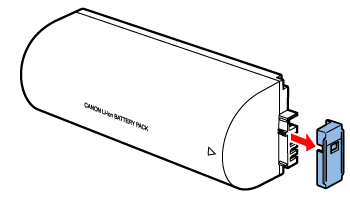
2. Attach the battery pack to the charger adapter.
Slide the terminal-end in the direction of the arrow  and insert the other end
  until it clicks into place.
and insert the other end until it clicks into place.
Connect the power cord to the charger adapter with the battery pack inserted.
- Battery charging begins, and the orange lamp is lit.
- When charging is finished in about four hours, the green lamp will be lit.
- Charging continues if you turn on SELPHY with the charger adapter connected but will stop while printing.

Connect the charger adapter to SELPHY.

NOTE
- For battery precautions, refer to the battery user manual.
- Keep the charger adapter on a desk or other stable surface while it is connected to SELPHY, and be careful not to unplug the cable by mistake.