








Decorating scenes during playback (LEGRIA mini)
Solution
Have fun decorating movies while playing them back with friends and family. Decorations added during playback are not recorded with scene.
REFERENCE
- If you want to decorate a previously recorded scene and save the decorations, convert the scene to MP4 and decorate it during the conversion. This will create a new scene with decorations, in addition to the original scene. For more information, please refer to Adding Decorations to Recorded Scenes (LEGRIA mini).
- For details on playing back movies, please see Playing back the scene you want to see (VIXIA mini / LEGRIA mini).
1. Play back the scene you want to decorate.
2. Touch the screen to display the playback controls.
3. Touch [  ] to display the decoration toolbar.
] to display the decoration toolbar.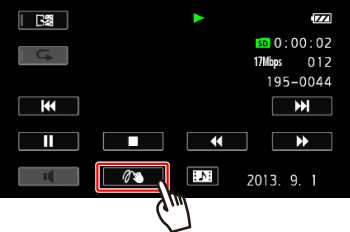
4. Decorate the scene using the tools from the toolbar.

NOTE
- For more information on how to use the decoration tools, please refer to the Related information.