








Using a tripod (XF200 / XF205)
Solution
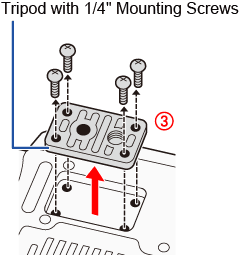
You can mount the camcorder on any tripod with a 1/4" mounting screw, no longer than 5.5 mm (0.2 in.).

 : Tripod socket,
  : Attachment sockets for the optional TA-100 Tripod Adapter
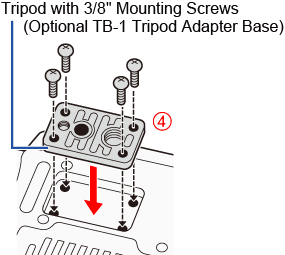
To use a tripod with 3/8" mounting screws, first attach the optional TB-1 Tripod Adapter Base to the camcorder and then attach the tripod to the adapter base.
1. 1 Remove the tripod base from the camcorder. ( )
)
)- Remove the 4 screws and then remove the base.
2. 2 Attach the optional TB-1 Tripod Adapter Base. ( )
)
)- Firmly screw in the 4 screws.
3. Attach the tripod.
- Firmly screw in the tripod screw.
- If a tripod has both a 1/4" screw and a 3/8" mounting screw, firmly screw in both.
IMPORTANT
Using tripods with longer mounting screws may cause damage to the camcorder.
