








A red frame is displayed on images during playback (EOS 7D Mark II)
Solution
When [AF point disp.] in the Playback menu is set to [Enable], the AF point that achieved focus will be displayed in red.

NOTE
- If automatic AF point selection is set, multiple AF points may be displayed.
- [Disable] is set by default.
Solution: Change the setting to prevent AF point display during playback.
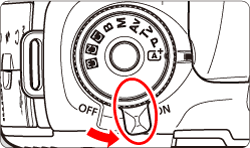
1. Set the camera's power switch to <ON>.
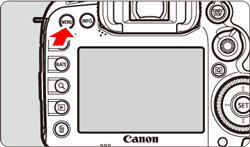
2. Press the <MENU> button to display the menu screen.
3. Press the < > button and select the [
  ] tab.
> button and select the [ ] tab.

4. Turn the < > dial to select the [
  ] tab.
> dial to select the [ ] tab. 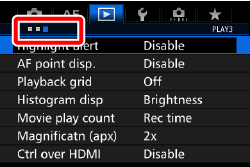
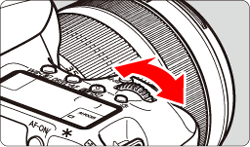
5. Turn the < > dial to select [AF point disp.], then press <
 >.
>.
> dial to select [AF point disp.], then press <>. 

6. Turn the <> dial to select [Disable], then press <>.
> dial to select [Disable], then press <>. 
7. Press the < > button and confirm that AF points are not displayed during playback.
> button and confirm that AF points are not displayed during playback.